How to pay estimated taxes.
If you own a business, the IRS expects you to pay as you go. Here’s a step-by-step guide to making estimated tax payments to both the IRS and your state.
Payment links
Not sure whether you need to pay, when, or how much? Start with how much to pay in estimated taxes. Know what you owe? You make two separate payments: one to the IRS and one to your state. Neither covers the other. Click a state for my step-by-step guide, or its web address to go straight to the official payment site. First time? Follow the IRS walkthrough below.
Federal IRS Direct Payirs.govStates
- Alabamamyalabamataxes.alabama.gov
- Arizonaaztaxes.gov
- Arkansasatap.arkansas.gov
- Californiaftb.ca.gov
- Coloradotax.colorado.gov
- Connecticutdrs.ct.gov
- Delawaretax.delaware.gov
- Georgiagtc.dor.ga.gov
- Hawaiihitax.hawaii.gov
- Idahotax.idaho.gov
- Illinoismytax.illinois.gov
- Indianaintime.dor.in.gov
- Iowagovconnect.iowa.gov
- Kansaskansas.gov
- Kentuckyepayment.ky.gov
- Louisianalatap.revenue.louisiana.gov
- Mainerevenue.maine.gov
- Marylandmdtaxconnect.gov
- Massachusettsmtc.dor.state.ma.us
- Michiganmitreasury-eservices.michigan.gov
- Minnesotarevenue.state.mn.us
- Mississippitap.dor.ms.gov
- Missourimytax.mo.gov
- Montanatap.dor.mt.gov
- Nebraskarevenue.nebraska.gov
- New Jerseynj.gov
- New Mexicotap.state.nm.us
- New Yorktax.ny.gov
- North Carolinaeservices.dor.nc.gov
- North Dakotatap.tax.nd.gov
- Ohiotax.ohio.gov
- Oklahomaoktap.tax.ok.gov
- Oregonrevenueonline.dor.oregon.gov
- Pennsylvaniamypath.pa.gov
- Rhode Islandtaxportal.ri.gov
- South Carolinador.sc.gov
- Utahtap.tax.utah.gov
- Vermonttax.vermont.gov
- Virginiatax.virginia.gov
- Washington, D.C.mytax.dc.gov
- West Virginiamytaxes.wvtax.gov
- Wisconsintap.revenue.wi.gov
Step-by-step guides: New York and California. Thresholds and schedules vary by state, so check your state's estimated tax page before your first payment. If you moved this year, you may owe estimates to both states.
Paying the IRS, step by step
What you need
- A federal return you filed in the last six years, to verify your identity.
- Your bank routing and account numbers.
- About five minutes. No account or sign-in is required.
- Go to Direct Pay. Open IRS Direct Pay and click “Pay individual tax.”
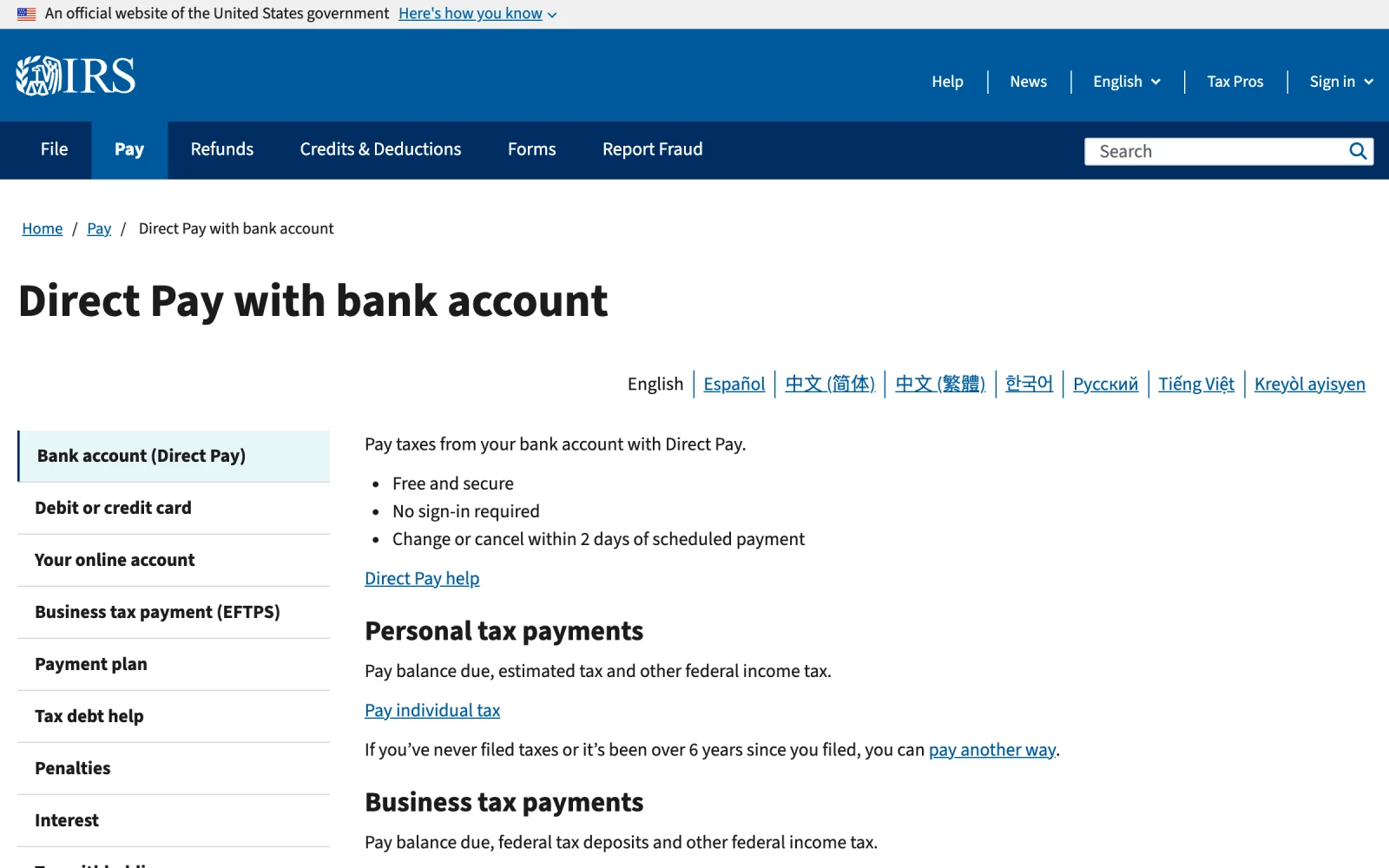
- Click “Pay individual tax” under Personal tax payments.
- Choose what you are paying. Select Form 1040 - Income Tax, then Estimated Tax, then type the year the income is earned. A January 2027 payment covers 2026.
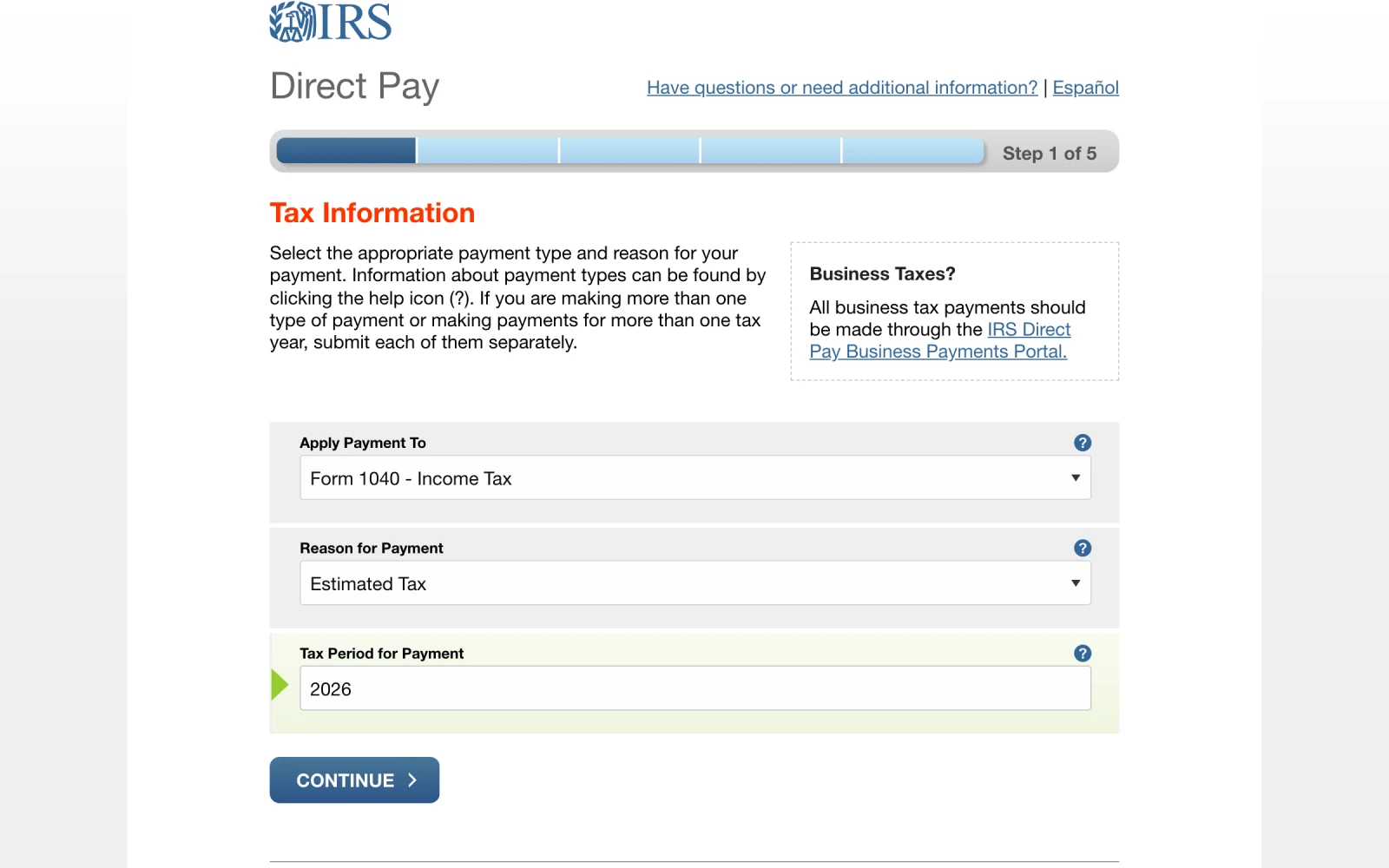
- Apply Payment To: Form 1040 - Income Tax.
- Reason for Payment: Estimated Tax.
- Tax Period for Payment: the year the income is earned.
- Confirm your choices. Direct Pay repeats them back. If it does not say Estimated Tax and the year you meant, click Cancel and fix it.
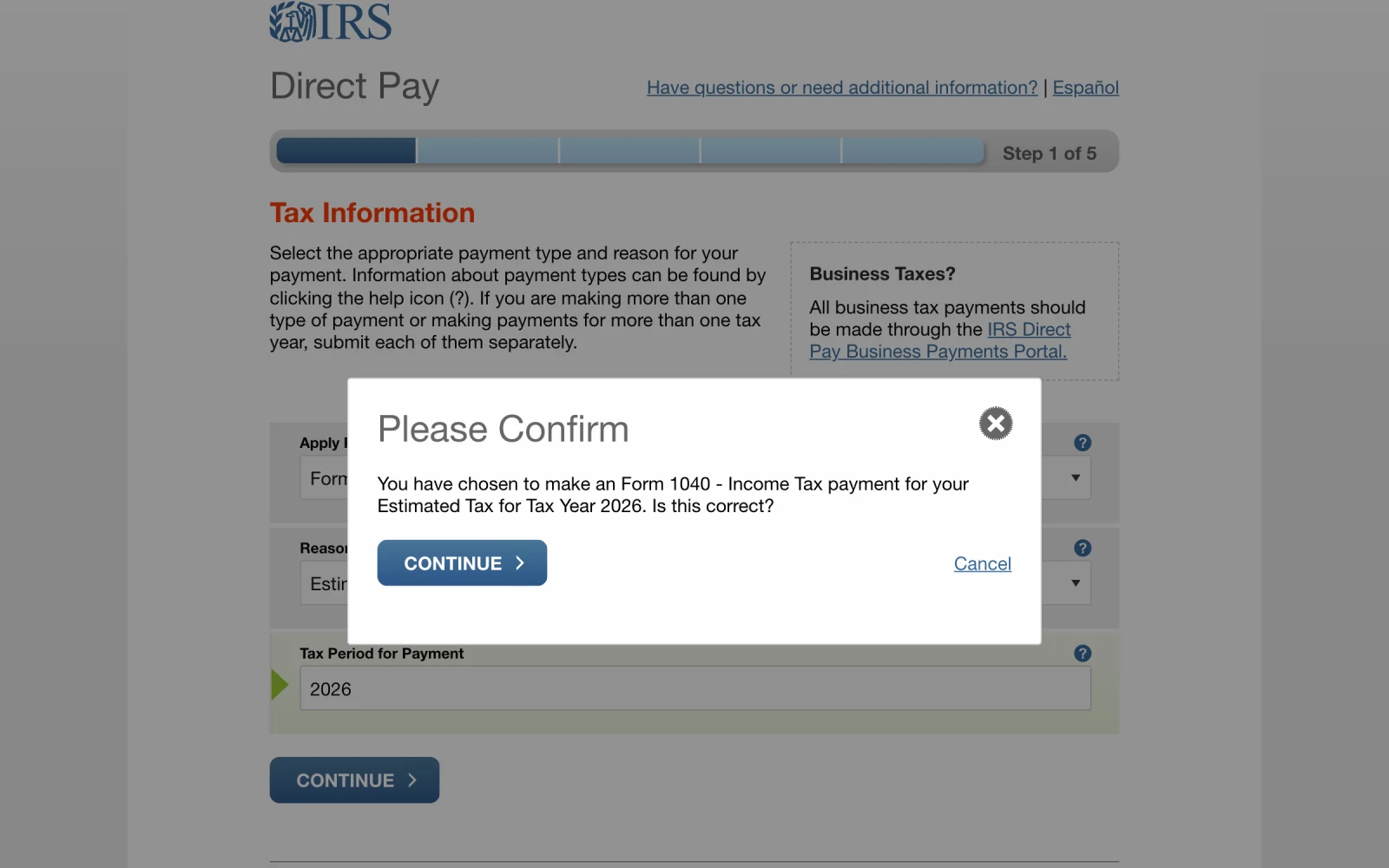
- Check that it says Estimated Tax and the right year.
- Then click Continue. If anything is wrong, click Cancel and fix it.
- Verify your identity. Enter your filing status, name, Social Security number, date of birth, and address exactly as they appear on that return, even if you have moved. Filing jointly? Use the first spouse listed.
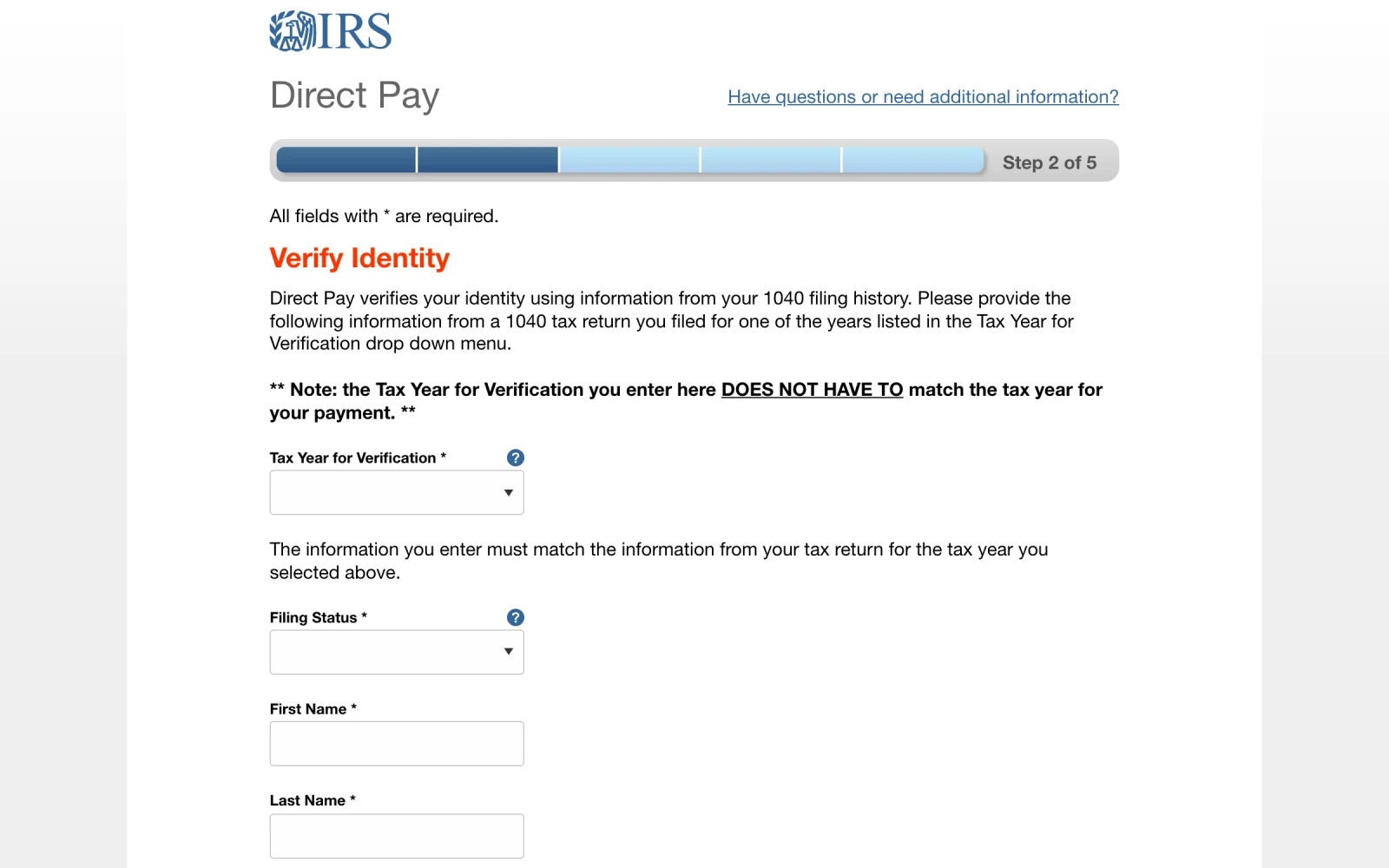
- Pick any year you filed. It does not have to match the payment year.
- Enter the payment. Type the amount twice, pick a date on or before the deadline, and enter your bank details. You can schedule payments up to 365 days ahead, so you can set up all four in January. Choose an email confirmation, then accept the agreement and submit.
- Save your record. Screenshot the confirmation page and note the date, amount, and confirmation number. The confirmation email leaves out the amount and date, and you need the number to change or cancel the payment (allowed up to two business days before it goes out).


The IRS will not fill these payments in for you. Your preparer has to enter each estimated payment on your return. Keep your own record and send it to whoever prepares your taxes.
Other ways to pay: an IRS Online Account (free, shows every payment you have made) or a card through an IRS-approved processor (1.75% to 1.85% for credit cards, about $2 for debit cards). EFTPS is closing to individuals, so use Direct Pay instead.
New York and California
Your state payment is separate from the IRS. I have step-by-step guides with screenshots for New York and California:
For every other state, use the payment links above.
How to submit extension payments
If you are filing on extension, you still have to pay what you owe for last year by April 15. An extension payment is not the same as an estimated payment, and mixing them up is one of the most common and costly mistakes: if you send last year's balance as an estimate, it gets applied to the new year, your old balance looks unpaid, and penalties and interest start on money you already sent.
The IRS and each state need separate payments. If you are also making this year's first estimate on April 15, submit it as its own transaction.
Federal
- Open Direct Pay and click “Pay individual tax.”
- Choose Form 1040 - Income Tax, then Extension, then last year as the tax period. The Extension option appears during filing season and disappears after the October deadline.
- Verify, pay, and save the confirmation, the same as an estimated payment. Paying this way files your federal extension automatically, so you do not need to send Form 4868.
New York
A federal extension does not extend New York. Request New York's own extension (Form IT-370) and pay through your Online Services account by April 15. See the New York steps.
California
California extends the time to file automatically, but not the time to pay. Pay through Web Pay with the payment type Extension and last year as the tax year. See the California steps.
Any other state? Check its extension rules on its official site, or ask me or your tax preparer before you pay.
Keeping records
Confirmation emails from tax agencies often leave out the amount and date, so they are not enough on their own. I recommend three things:
- A folder named “Estimated Taxes [year]” in your cloud drive with a screenshot of every confirmation page.
- A simple log with five columns: date paid, agency, tax year applied to, amount, and confirmation number.
- A check before you file. Sign in to your IRS Online Account and your state account, confirm the payment totals match your log, and send the log to your preparer.
If you are married: payments are tracked under the Social Security number entered when you pay. If you plan to file jointly, make every payment under the same spouse, ideally the first spouse listed on your return. If you might file separately, decide in advance how you will split the payments, because you will each need to claim your share.
Quarterly checklist
Once, in January
- Pull last year's total federal and state tax and AGI.
- Pick a safe harbor (see how much to pay).
- Calculate each federal and state installment.
- Schedule your federal payments in Direct Pay and your state payments on its site.
- Create this year's “Estimated Taxes” folder and log.
A week before each deadline
- Confirm the scheduled payment is still correct, or make it now.
- Check the bank account has the cash.
- Think about anything big that happened this quarter: a sale, bonus, or new contract.
- Save the confirmation and update the log.
When you file
- Compare your log to your IRS and state account history.
- Send the log to your preparer.
- Decide whether to apply any refund to next year's estimates.
This guide is for general education and reflects rules as of October 2026. Tax law and agency websites change, and your situation may have details that change the answer. Please talk with your tax professional before acting on it.